How to Prepare a Quotation for a Client (With Examples)
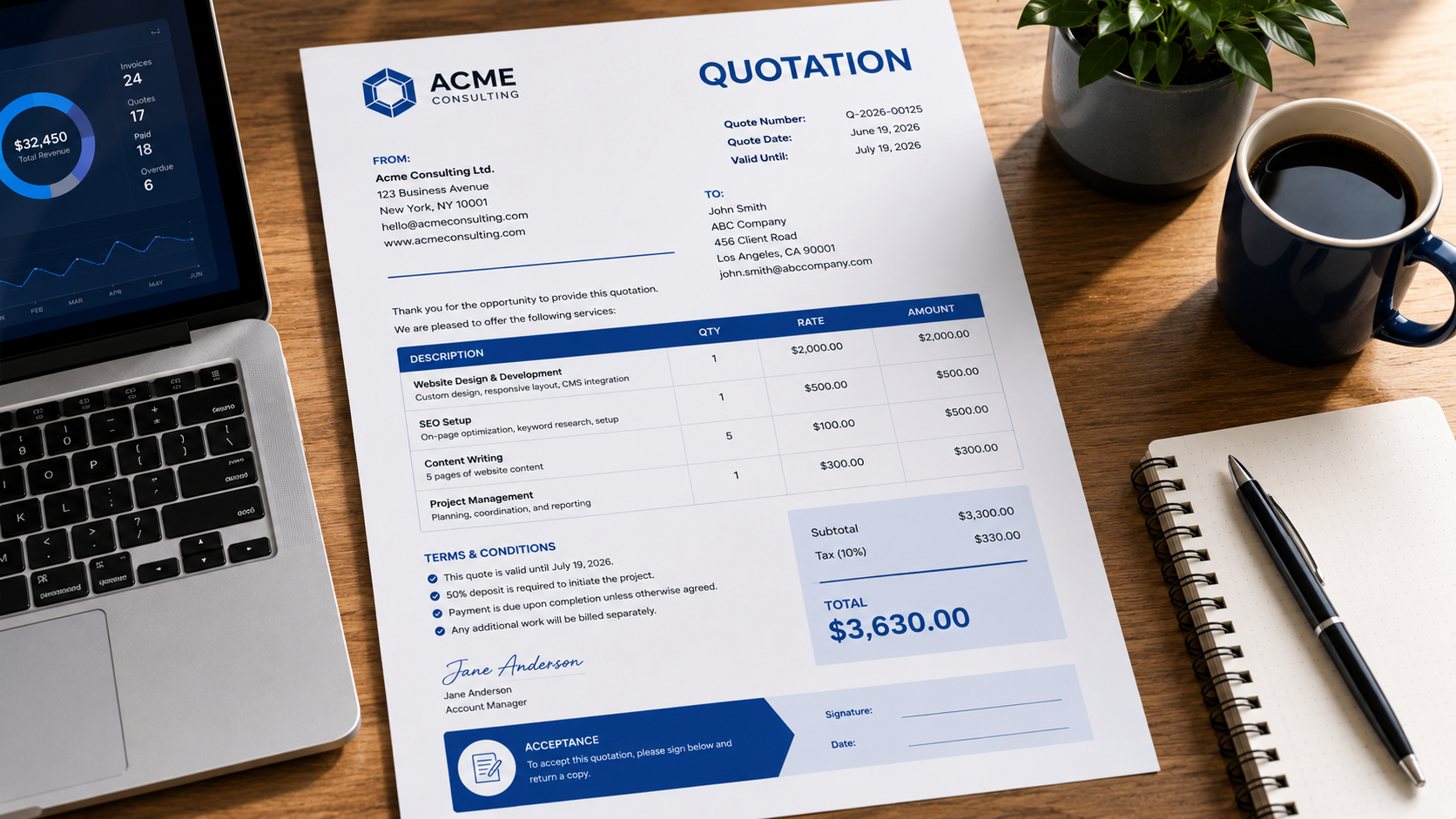
A professional quotation tells a client exactly what you will provide, how much it will cost, how long the offer is valid, and any terms that apply. A clear quotation makes it easier for the client to compare options and approve the work without confusion.
Simplify your billing with an professional invoice generator that helps you create invoices in seconds.
This guide shows you how to prepare a quotation for a client, what information to include, and how to structure it professionally.
What is a quotation for a client?
A quotation, often called a quote, is a document sent before work begins that sets out the proposed products or services, prices, taxes, totals, validity period, and key terms.
A quotation is different from an invoice. A quotation proposes a price before the client approves the work, while an invoice requests payment after work has been completed or payment has become due.
How to prepare a quotation for a client
Follow these steps when preparing a client quotation:
- Add your business details. Include your business name, email, phone number, address and logo if you use one.
- Add the client's details. Include the client's name, company and contact information.
- Assign a quotation number. Use a unique reference such as
Q-2026-001so the document is easy to track. - Add the issue date and validity period. State when the quotation was created and how long the price remains valid.
- Describe the work clearly. List each product, service or deliverable in plain language.
- Show quantities and prices. Include quantity, rate and amount for each line item where relevant.
- Calculate subtotal, tax and total. Make the final amount easy to find.
- Add payment and project terms. Include deposits, payment schedule, delivery dates, revision limits or other important conditions.
- Add an acceptance section if needed. Give the client a clear way to approve the quotation.
- Review the quotation before sending it. Check names, figures, dates, tax and spelling.
What information should a professional quotation include?
A strong quotation normally contains:
- your business name and contact information;
- the client's name and contact information;
- quotation number;
- quotation date;
- expiry or validity date;
- clear descriptions of products or services;
- quantity and rate where applicable;
- subtotal;
- tax or other charges;
- total quoted amount;
- payment terms;
- delivery or project timeline;
- notes, exclusions or assumptions;
- acceptance details where appropriate.
Example quotation for a client
Suppose a web designer is quoting for a small business website. The pricing section could look like this:
| Description | Quantity | Rate | Amount |
|---|---|---|---|
| Website design | 1 | $2,000 | $2,000 |
| SEO setup | 1 | $500 | $500 |
| Hosting setup | 1 | $150 | $150 |
Subtotal: $2,650
Tax: $265
Total: $2,915
Below the pricing table, the designer could add:
- 50% deposit required before work begins;
- remaining balance due on completion;
- quotation valid for 30 days;
- two rounds of revisions included;
- estimated delivery time of three weeks.
This gives the client the price and the conditions needed to make a decision.
How detailed should a quotation be?
A quotation should be detailed enough that the client understands exactly what is included, but not so complicated that the main price and deliverables are difficult to find.
Instead of writing “Marketing services”, write something specific such as “Monthly SEO optimisation and performance reporting.” Specific descriptions reduce disputes and make the quotation easier to compare with competing offers.
Should a quotation include an expiry date?
Yes. A validity period protects you from having to honour an old price after your costs or availability have changed.
Common validity periods include 7, 14 or 30 days. Choose a period that makes sense for your business and state it clearly on the document.
Quote vs estimate vs invoice
A quote usually presents a specific price for defined work. An estimate gives an approximate expected cost that may change. An invoice requests payment.
If the scope is uncertain, an estimate may be more appropriate. If the scope and price are clear, a quotation gives the client a firmer offer.
Common quotation mistakes to avoid
Using vague descriptions
Generic wording makes it difficult for clients to know what they are approving. Describe the work, deliverables or products clearly.
Forgetting the validity period
Without an expiry date, a client may return months later expecting the same price.
Hiding taxes or extra charges
Show taxes, discounts and additional charges before the final total so the amount is transparent.
Missing payment terms
State when payment is expected and whether a deposit is required.
Sending a quotation without checking the totals
Always verify quantities, rates, tax and the final total before sending the document.
How to make a quotation look professional
Use a consistent layout, readable fonts, clear headings and enough spacing around the pricing table. Put your business identity at the top, keep the total prominent, and avoid unnecessary design elements that distract from the information.
If you want to create the document without formatting it manually, use the free business quote generator or start directly in the quote generator.
FAQ
How do I prepare a quotation for a client?
Add your business details, client details, quotation number, issue and expiry dates, itemised products or services, prices, taxes, total amount and key terms. Review the figures before sending it.
What is the best format for a client quotation?
A simple one-page or two-page layout is usually enough for straightforward work. Put business and client information near the top, itemised pricing in the middle, and terms plus acceptance details near the bottom.
Should I include payment terms in a quotation?
Yes. State deposits, payment schedule, due dates and accepted payment methods where relevant so the client knows the financial terms before approving the work.
Can a client accept a quotation by email?
That depends on your business process and local legal requirements. Many businesses accept written email approval, while others use signatures or a formal acceptance section.
Can I turn a quotation into an invoice later?
Yes. Once the client approves the work, you can reuse the approved line items and pricing when creating the invoice, adjusting only what changed during the project.
Create professional invoices in seconds
Free invoice generator — no sign-up required
Create Free Invoice →